



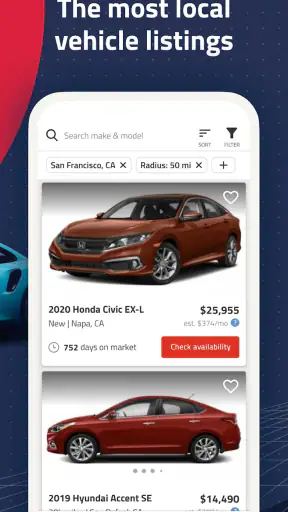
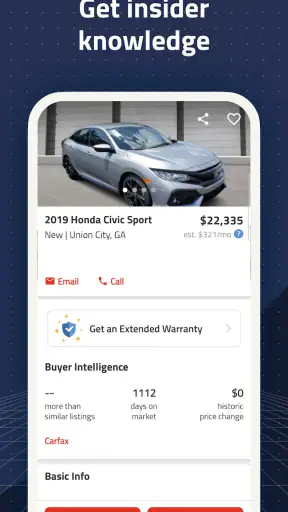
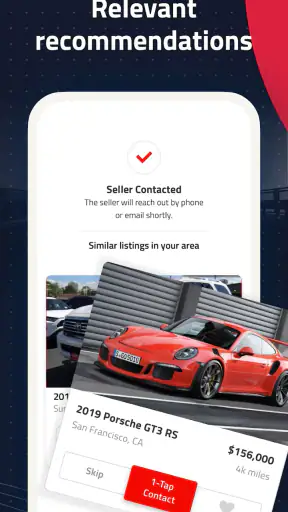
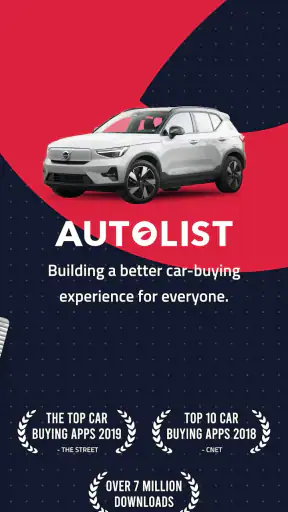
Buying a used car usually starts with a vague idea: a body style, a budget, perhaps a preferred make. The difficult part is turning that idea into a manageable shortlist without jumping between countless dealer pages and private listings. I found Autolist: Used Car Marketplace most useful as a focused search companion for that early and middle stage. It puts local used cars and trucks into one browsing experience, then gives me tools to compare candidates before I spend time arranging a viewing.
Developed by Autolist, this free Auto & Vehicles app is aimed at ordinary shoppers rather than professional dealers. It is available for Everyone and works on devices running Android 8.0 or later. Its current version is 14.18.0, and its broad adoption is reassuring: it has passed five million installs, with an average rating of 4.5 from roughly thirty-one thousand ratings and nearly ten thousand written reviews.
Those figures do not make the buying decision for me, of course. A marketplace is only as useful as the way I search, filter, save, and verify what I find. My experience is that Autolist becomes much better when I treat it as a repeatable research tool instead of a place to scroll casually until something looks attractive.
How I use Autolist from the first search to a realistic shortlist
Start with a buying brief, not a favorite listing
Before opening the search, I write down three things: the maximum amount I want to spend, the vehicle type I can actually live with, and the features that are genuinely important. This sounds obvious, but it prevents the common marketplace mistake of changing the search every time an appealing photo appears. A compact SUV, a pickup, and a small sedan can all look tempting in isolation; they are much easier to compare when I know which requirements are fixed.
Autolist is particularly helpful when I begin broadly and narrow gradually. I might first look at a body style or a group of makes, then adjust the search once I understand what is available locally. Starting too narrowly can hide reasonable alternatives, while starting with no limits can produce a feed that is difficult to evaluate. I prefer to make one change at a time so I can tell whether the results improved because of price, mileage, location, model year, or another filter.
The first pass is not about choosing a car. It is about learning the local market. I look for repeated patterns in asking prices and notice which vehicles appear in several similar listings. That gives me a reference point before I become emotionally attached to a single example. If one listing seems unusually cheap, I treat that as a prompt for more checking, not as an automatic bargain.
Read each result as a set of questions
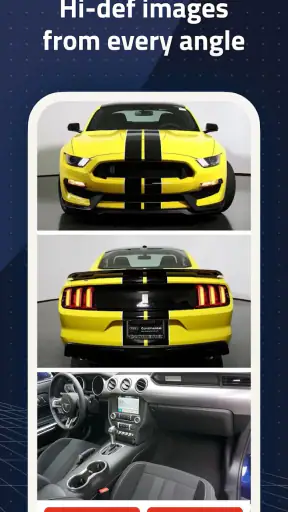
Photos are useful for spotting obvious condition issues, but they are also designed to make a vehicle look its best. I zoom in on panel gaps, tire wear, dashboard warnings, seat damage, and signs that the pictures may not show every angle. I also read the text carefully instead of relying on the first image and the headline. A short description can leave important questions for the seller, so I keep a note beside the listing rather than assuming the missing detail is favorable.
The practical advantage of a marketplace like this is the ability to compare several candidates without rebuilding the same search from scratch. I use that advantage to create a shortlist with different roles: one vehicle that fits the budget comfortably, one that offers better equipment, and one fallback option from a different seller or model family. This is more useful than collecting ten nearly identical listings that I will never contact.
When I find a promising car, I save it and return later with a cooler head. A listing that feels perfect at night can look ordinary the next morning. Saving candidates also helps me compare changes in asking price or availability when I revisit them. I do not assume that a saved listing is reserved, inspected, or still available; it is simply a marker for my own research.
A realistic everyday buying scenario
Imagine I need a reliable second vehicle for commuting and occasional family trips. I search for used cars within a practical distance, set a firm upper budget, and avoid choosing a specific model immediately. After browsing, I save a few compact cars and small SUVs. One has the lowest price, another has the most appealing equipment, and a third is slightly farther away but appears to offer a better balance.
Instead of contacting all three with a generic message, I make a separate question list for each one. I ask whether the seller still has the vehicle, whether the listed mileage and equipment are accurate, and whether I can arrange an independent inspection. I then compare the answers, the distance, the listing quality, and the total effort involved. Autolist helps me organize the discovery stage, but it does not replace a test drive, a document check, or a mechanic’s opinion.
Settings and filters worth checking before browsing deeply
The most important controls are the ones that prevent irrelevant results from taking over. Location matters because a low asking price loses its appeal when the vehicle is impractical to collect. I set a radius that matches how far I am genuinely willing to travel, not the distance I might tolerate in an optimistic mood. If I am only browsing the market, I may widen it temporarily, but I keep that exploratory search separate from my serious shortlist.
Price should be treated as a ceiling rather than a target. I leave room for registration, insurance, inspection, maintenance, and travel costs outside the app. If I use every available dollar on the listing price, Autolist can make the vehicle appear affordable while the real purchase becomes uncomfortable. A useful habit is to run two searches: one for the maximum I could pay and another beneath it, representing the amount I would prefer to spend.
Model year and mileage filters need similar care. Tight limits can make the results feel tidy, but they may remove vehicles with better maintenance histories or more suitable equipment. I would rather compare a slightly older, well-documented candidate with a newer car that gives me little confidence. Filters are there to reduce noise, not to make a complicated decision look artificially simple.
I also check whether the results are being shaped by sorting choices. A low price, a nearby location, and a recently added listing answer different questions. I do not use one sort order for the entire process. Price is useful for understanding the bottom of the market; distance is useful when planning visits; recency can help when I want to contact listings before my shortlist becomes stale.
Use saved listings as a decision workspace
Saving vehicles is more valuable when I attach a reason to each one. I might remember one as the “best condition to verify,” another as the “lowest total travel effort,” and a third as the “equipment alternative.” The app itself may not provide a place for all those notes, so I keep them in a simple phone note. That small extra step stops my saved list from becoming a pile of attractive photos with no clear purpose.
I also remove candidates that fail a basic requirement. Keeping every possibility feels safe, but it makes comparison harder and encourages me to reopen listings I had already rejected. A short saved list is easier to inspect for price, mileage, location, and seller details. It also makes my next action obvious: contact, research, visit, or discard.
One less obvious benefit is emotional distance. When I save a listing rather than immediately messaging the seller, I create a pause in which I can compare it with alternatives. That pause is especially useful for vehicles with unusually polished photographs or an attractive price. The app supports discovery; my habit supplies the discipline.
Faster patterns for experienced browsing
Once I know the type of vehicle I want, I stop repeating broad searches. I begin with the narrowest useful version, inspect the results, then loosen only one restriction when the list is too small. For example, I may expand the distance before changing the budget, because paying more is a bigger decision than driving farther. In another situation, I may broaden the model year while keeping the price and location fixed.
This one-variable approach is a simple shortcut with a real benefit: I can see what trade-off I am making. If I change price, year, mileage, and distance together, I learn nothing about which compromise produced the better choices. Autolist is quick enough for this type of iterative search, and the method makes the browsing process feel much less random.
I use the app in short sessions rather than one long scroll. A first session establishes the market and saves possible candidates. A second session removes weak options and checks details. A third session prepares questions and visit plans. This rhythm reduces fatigue, which matters because tired browsing makes every new listing look more convincing than the last one.
Another efficient pattern is comparing unlike candidates by ownership risk rather than appearance. A cheaper vehicle may need more immediate work, while a slightly more expensive example may be easier to inspect locally or have a clearer description. The app cannot calculate my personal risk, but its listing information gives me a starting point for that comparison. I look beyond the monthly-payment mindset and ask what could make each option costly after purchase.
What Autolist does well compared with usual alternatives
The usual alternative is searching one dealership website at a time. That approach may provide useful seller information, but it is slow for discovering the wider local range. Autolist is more convenient for the initial sweep because I can examine different used cars and trucks in one place and move between candidates without maintaining a separate list of dealer pages.
Another alternative is a general classifieds service. Those platforms can be excellent for private-party bargains and unusual vehicles, but the quality and completeness of listings may vary substantially. Autolist feels better suited to shoppers who want a vehicle-focused browsing experience and a more structured starting point. I still verify every important detail directly, because a clean interface does not guarantee that a listing is complete or current.
Dealer-only searches can be better when I already know the exact model and want to focus on a specific seller’s inventory, purchase process, or service options. Autolist is stronger earlier in the journey, when I am comparing the market and deciding what deserves a closer look. It is not a replacement for a dealer’s final paperwork or a private seller’s direct answers.
Where the workflow reaches its limits
The biggest limitation is shared by nearly every vehicle marketplace: a listing is not an inspection. Photos cannot confirm mechanical condition, and a description cannot substitute for service records, a vehicle history check, or a professional evaluation. I would never treat an appealing Autolist result as proof that the vehicle is ready to buy.
Information can also become outdated. A saved listing may no longer represent what is available when I am ready to act, so I confirm availability before planning a long trip. I also recheck the asking price and equipment with the seller. This is not a reason to avoid the app; it is a reason to use it as a live lead-generation tool rather than a permanent catalog.
Search filters can create false confidence as well. A vehicle matching my selected year, price, and mileage can still be wrong for my needs because of condition, ownership history, accident damage, or an inconvenient seller location. The more filters I add, the more important it becomes to review what they exclude. I occasionally perform a broader search to make sure my settings have not hidden a sensible alternative.
People seeking a very specific classic, rare trim, heavily modified vehicle, or private-party negotiation may prefer a specialist community or a broader classifieds platform. Autolist is most comfortable for mainstream used-car discovery. It is also not the right tool for someone who wants the app to make the buying decision automatically. I still have to judge value, ask uncomfortable questions, and walk away when the answers are weak.
Practical questions I answer before contacting a seller
I ask myself whether the listing is close enough to inspect properly, whether the price leaves room for ownership costs, and whether the vehicle fits my actual daily routine. If the answer to any of those is no, I remove it before sending a message. This avoids wasting the seller’s time and keeps my own shortlist honest.
I also prepare questions that cannot be answered by browsing. I want to know whether the vehicle is still available, whether the listed details are accurate, and whether an independent inspection is acceptable. If a seller avoids basic questions or pressures me to commit before seeing the car, I treat that behavior as a reason to stop, regardless of how good the listing looks.
For a long-distance candidate, I confirm more before traveling than I would for a nearby one. I want current photos, a clear appointment, and agreement on what I will be able to inspect. A marketplace can help me find an appealing vehicle several hours away, but it cannot make the travel risk disappear. Sometimes the nearby option with slightly less equipment is the smarter purchase because I can evaluate it properly.
Device support, cost, and who should use it
There is no purchase barrier to trying Autolist because the app is free. Its Everyone age rating also makes it broadly accessible for household research, although the responsibility for safe communication and a sensible vehicle inspection remains with the adult making the purchase. Android users need version 8.0 or newer, so owners of very old devices should check compatibility before planning their search around it.
I would recommend it to first-time buyers who need help understanding what is available nearby, families comparing several vehicle types, and experienced shoppers who want a faster way to scan local inventory. It is also useful for someone who is not ready to buy today but wants to build a realistic picture of prices and availability before setting a budget.
I would be more cautious about recommending it to a buyer who already has a trusted dealer and an exact stock number, because a marketplace search may add little value at that point. The same applies to someone who refuses to verify condition independently. No app can turn an unverified listing into a safe purchase, and Autolist should not be used as an excuse to skip the difficult parts of buying a used vehicle.
My mastery verdict
After using Autolist as a structured search tool, I see its main strength in the space between “I need a vehicle” and “I am ready to inspect this exact one.” It helps me survey local used cars and trucks, compare alternatives, save candidates, and refine a search without constantly starting over. The experience is most effective when I bring a clear budget, sensible filters, and a willingness to verify everything that matters.
The best users will combine the app with a few repeatable habits: begin with a buying brief, change one filter at a time, keep the saved list short, separate asking price from total ownership cost, and contact sellers with specific questions. Those habits reveal the app’s value more clearly than endless scrolling. They also protect me from its natural weaknesses, including stale listings, incomplete descriptions, and the temptation to confuse a polished presentation with a sound vehicle.
My final view is positive but practical. Autolist is a strong free starting point for local used-car research, especially when I am comparing several possibilities rather than chasing one exact vehicle. It does not replace inspection, paperwork, negotiation, or judgment, and specialist alternatives may be better for rare vehicles or seller-specific purchases. Used with those limits in mind, it turns a messy search into a calmer shortlist and gives me a better chance of choosing the right car for my real life instead of the most attractive listing on the screen.


